


Hardware Installer & Onboarding UXSamsara: Hardware Onboarding UX
Identifying $291K+ in support costs due to onboarding friction and delivering physical/digital improvement recommendations to streamline the installation process and reduce user confusion.
Role
UX Researcher and Designer
Timeline
12 weeks
Skills
Research
Content Writing
Prototyping
Tools
Google Docs
Adobe Illustrator
Jump to Section
The Problem | The Solution | Conducting Research | Defining the Opportunity | Developing a Solution | Takeaways
The ProblemHardware is the Customer’s First Touch, but Install Guide Complexity Increased
Samsara is both a hardware and software company; they sell cloud-connected devices that digitize physical operations (trucking, construction, asset management). To manage their operations on the software platform, the first step in setting up is installing their hardware devices.
With hardware being the first touch point for a user, the installation process is crucial for a user’s success. Each device ships in a box to the user with an install guide and any necessary accessories or cables for physical install.
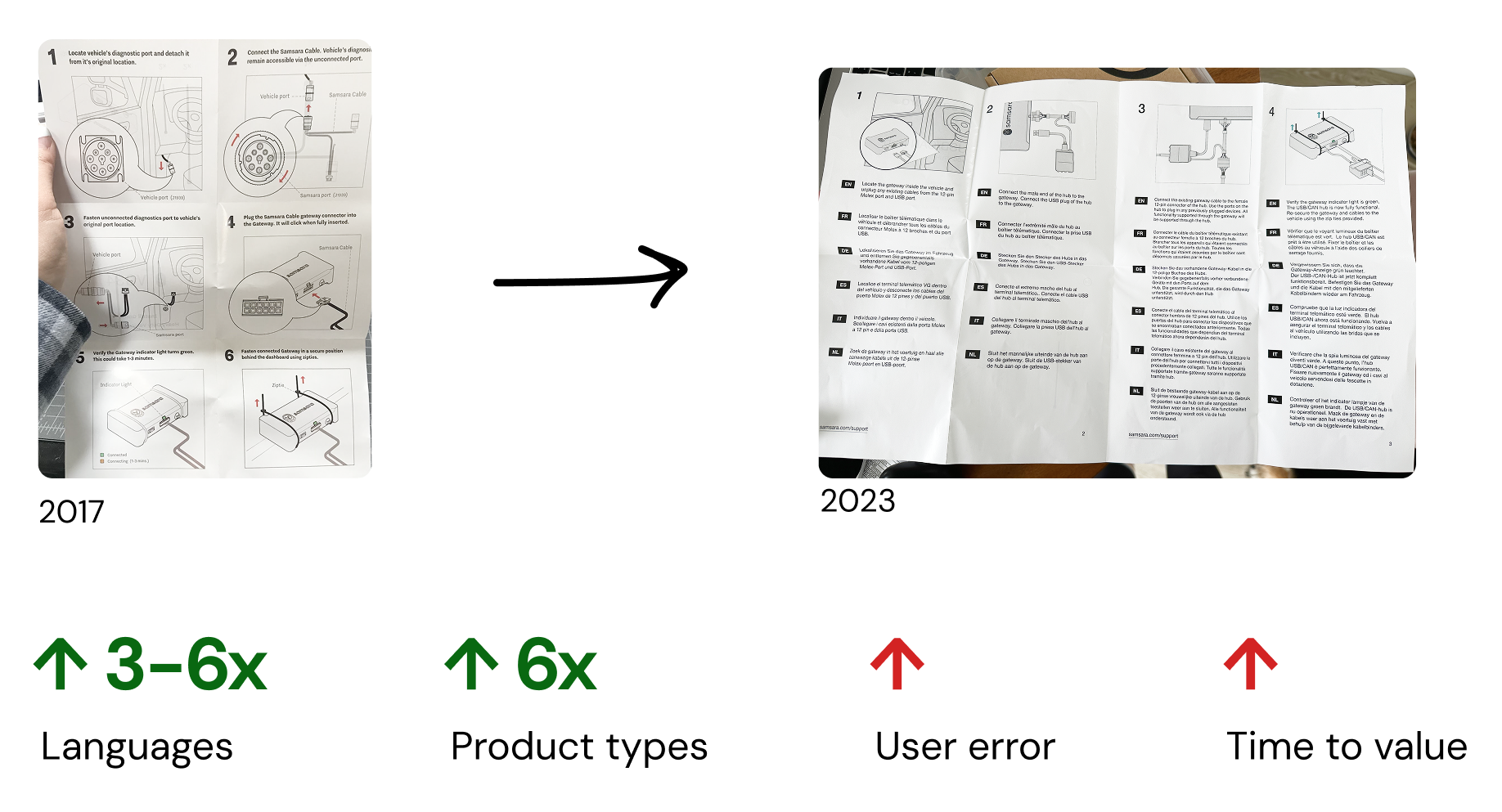
In 2017, an install guide for the Vehicle Gateway fit on one page: 6 steps, English only. By 2023, each install guide had 3-6 languages, adding bulk and noise to an install guide and increasing the time for a user to get value out of Samsara’s platform.
Internally, there was also duplicative work: the Hardware team created the PDF install guides in multiple languages. The guides got passed to Information Experience. The iX team would create help articles on the Knowledge Base for installation instructions, often adding additional helpful information and therefore also needing to do their own translations for any multi-language products. There was tension between the PDF guides and the KB articles as to which was the source of truth to point both internal team members and users to.
What started with a goal to improve install guides led to a investigation that discovered $291,000 of labor costs related to addressing support tickets tagged “Physical Install,” flagging a huge need to improve the hardware onboarding experience.
Creating a Holistic Onboarding ExperienceThe Solution: Bridging the Gap Between Hardware and Software

UpdatED Mobile App FlowCo-wrote the dash camera (CM32) mobile onboarding flow on the Samsara Fleet App with the mobile designer

Digital Install GuidesInitiated the replacement of PDF guides with QR codes to Knowledge Base articles and updated the dash camera product packaging to highlight the digital experience

Consistent LED BehaviorWrote the LED behavior guide to align hardware statuses with digital design system states across all product lines
By getting a literal seat at the table during design leadership syncs, I championed the importance of Hardware UX as part of a holistic onboarding experience.
System level changes takes time, so although these project deliverables were completed by late 2023, it took through 2025 to be fully implemented.
As of 2025, the Hardware Product Design team no longer creates PDF formatted install guides as they were consolidated into Knowledge Base articles. The team responsible for the KB articles, the Information Experience team, provides multi-language and print options for each article so users can still get the offline support they need.
To get to this point took lots of internal probing: connecting and collaborating with multiple GTM teams and deep sampling data from the customer support team.
Gathering key informationConducting Research
All Roads Lead to Customer Support
I worked backwards from the hardware experience, thinking about the moment an installer connected to the mobile app all the way back to when a fleet manager signed up to use Samsara.
Users received information and resources to get started on their journey, but 5 major teams owned the creation and distribution of these resources, as seen in the graphic below. Each product resource was designed to the best of their ability and the thought was that if something went wrong, users could reach out to the Customer Support team.
In reality, the user uses resources all resources throughout the onboarding process: They are not siloed to the user and so the resources need to maintain a consistent voice between them in addition to being consistent with any Support documents.
Support Tickets Tagged “Physical Install” cost $291,000 to address.
In discussing with customer and product support teams, I discovered that that from July 2022 to 2023, there were over 7,000 L1 (Level 1) support tickets tagged “Physical Install.” The cost to address each ticket was an average of $40/ticket, not including any resolution time or actions.
The next step was to deep sample L1 tickets from each major product line across Dash Cameras, Asset Gateways, and Vehicle Gateways, to actually understand which product areas were causing the most onboarding grief. I partnered with the Product Support Engineers to query and categorize these tickets.
Gaining User Insights From Deep Sampling
After this review, we found that only 10-25% of tickets were related to the hardware being physically installed (adhesive, mounting, incorrect cables used), and approximately 50% of tickets were mistagged and actually related to product activation.
This led to the UX focus areas: We can improve user experience through focusing on activation instruction, bridging the gap between physical setup and dashboard connectivity.

Defining the opportunityHow Might We…
provide the smoothest onboarding experience for customers setting up new hardware who need guidance getting their first connected data point?
converging, diverging, convergingDeveloping a Solution
The solution came in 3 parts:
Educating the user in the packaging and mobile app to properly install AND activate the product
I worked closely with the dash cam hardware designer and mobile app designer to make sure the instructions were clear and consistent in
Digitizing the install resources so they were as accessible and as easy to maintain as possible
PDF guides were replaced by KB articles, and rather than shipping with printed multi-page, multi-language guides, QR codes were printed inside the box, ensuring a user can always see the latest instructions in their language
Aligning the products to have consistently communicated system states, for the physical device and web/mobile interfaces
I created an LED behavior guide of colors and blink patterns for different system states so designers and hardware engineers across product lines could maintain consistency.
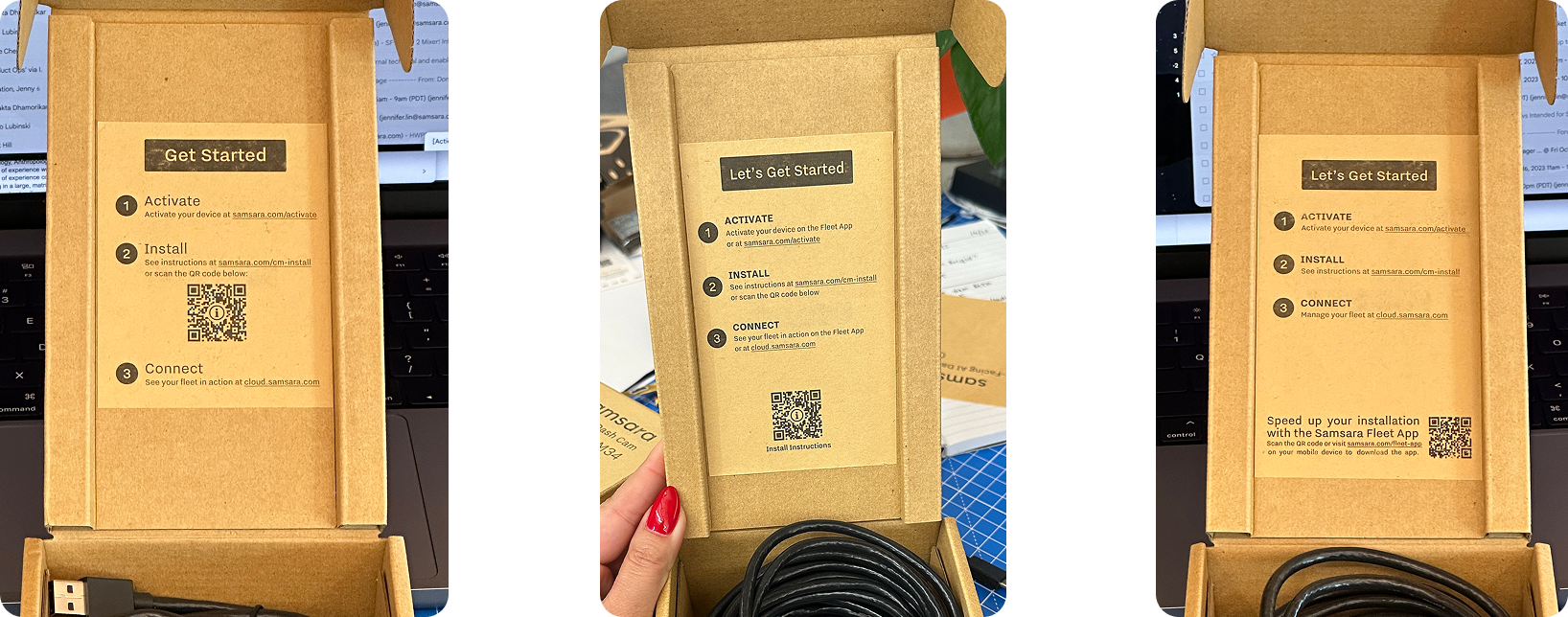
I created and internally tested 3 inner flap designs for the product packaging to see which would be most user-friendly. The middle design won the testing and was implemented in the final packaging.
Challenges Faced
Challenge #1: Leadership Buy-In
How to convince leadership to approve system-level structure changes when it affects multiple teams?
Quantify the problem to show cost-down opportunities and user impact, beyond just internal pain points
Challenge #2: Cross-functional Lead Times
How to move forward efficiently when the 2 biggest partner teams are short-staffed or in the middle of re-orgs?
Schedule weekly checkpoints for alignment
Identify hardware-only UX improvements to make in parallel
A Look back on the JourneyTakeaways & Next Steps
Reflections
What Went Well
Because of my long tenure at Samsara, it was especially easy to identify consistency gaps in the onboarding experience across departments. This made it easy to build empathy with partnering teams and highlighted the importance of hardware UX early on.
I felt proud of the improvements and recommendations, knowing I was making an impact not just on the user experience but also easing pain points for my teammates.
I enjoyed working across both physical and digital spaces, ensuring a consistent experience for the entire hardware onboarding experience.
What I Learned
If hardware onboarding is not considered early on in the product flow, the support team may be unnecessarily burdened.
Quantitive data is needed in order to validate intuition and drive leadership buy-in
IC level pain points don’t exist in isolation; other teams are likely facing issues and it requires cross-functional partnership to make larger system-level changes.
With More Time…
I Would Validate Changes with Post-Launch Data
I left Samsara after these were delivered and approvals were in process, but if I were still there after the completion of the PDF install guide to KB article shift, I would re-sample support tickets to confirm that 1) these improvements have indeed lower the support costs and 2) fewer tickets were mis-tagged between activation and physical install.
Thanks for perusing!
If you’ve made it this far, I appreciate the time you spent reading this case study. If you like what you saw, send me an email and let’s talk about working together.
